
Dynamics 365 and Azure, built to hold up in production
Implementation, customisation and remediation for organisations that run their customer, case and grants work on Microsoft Dynamics 365, with Power Platform and Azure integration around it.
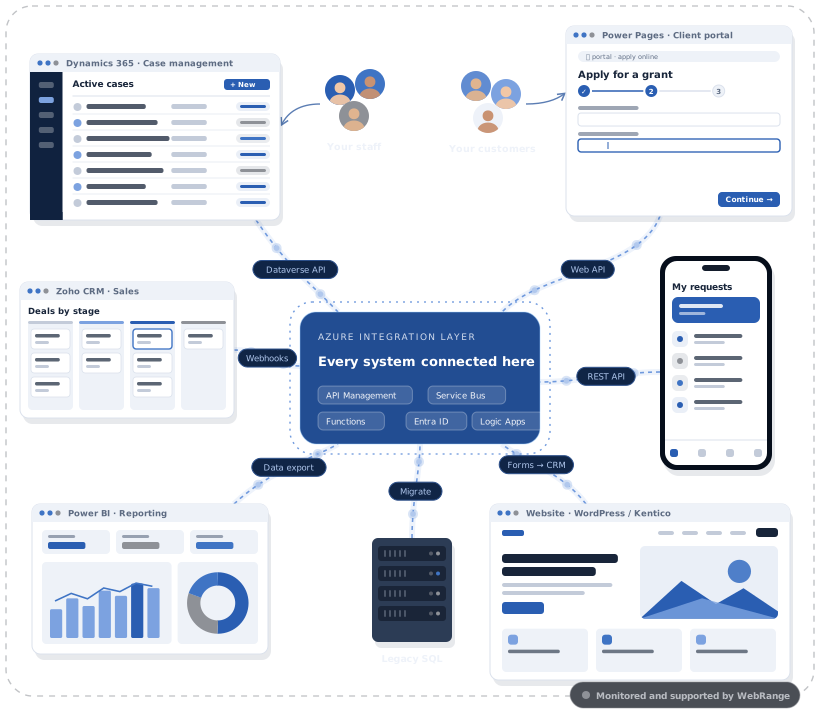
What clients usually bring to us
New implementations, and platforms that are already live and need fixing.
Several systems doing one job
Legacy CRMs, Access databases and spreadsheets brought onto one Dataverse platform, with the data migrated and duplicates resolved.
A platform that has slowed down
Slow saves, throttling and rising API consumption traced to their cause, usually overlapping flows, redundant plugins or polling integrations, and then fixed.
Customisations nobody wants to touch
Plugins and workflows reviewed, rationalised, documented and moved to patterns your team can maintain.
Stuck on old ways of working
Tenant-to-tenant migrations, the move to Unified Interface, and classic workflows rebuilt in Power Automate.
Dynamics 365 and Dataverse
- Solution design, data model and security model
- Configuration and customisation: forms, business rules, C# plugins and custom APIs
- Data migration designed to work within Dataverse service protection limits
- Integration with finance, identity, contact-centre and line-of-business systems
- Application lifecycle management and CI/CD in Azure DevOps
- Performance diagnosis and remediation for live environments
Dynamics 365 Customer Service, Sales and Customer Insights · Dataverse · synchronous and asynchronous plugin pipeline · custom APIs · Web API and batch requests · FetchXML · Power Pages · solution layering across environments and tenants · Azure DevOps · Application Insights and plugin trace analysis · Entra ID and Azure AD B2C
Apps, automation, reporting and portals
On licences you may already have, built so your IT team can support them.
Power Apps
Model-driven and canvas apps for defined processes such as inspections, approvals, registrations and case handling.
Power Automate
Flows that replace re-keying and email chains, with trigger conditions and error handling so they do not multiply load on Dataverse.
Power BI
Reports built on a clean data model, for the questions managers actually ask.
Power Pages
Secure portals for customers, applicants or partners, using the same Dataverse data as your internal teams.
A good fit
- Internal apps for well-defined processes
- Approval and notification flows
- Reporting on Dataverse or SQL data
- External portals with standard interactions
Think twice
- Very high transaction volumes
- Complex user interfaces
- Heavy integration logic, which usually belongs in Azure Functions or a custom application
We will tell you which side of the line your requirement sits on before you commit. Governance comes as standard: environment strategy, data loss prevention policies, solution-based ALM and performance reviews.
Queued, retryable and traceable
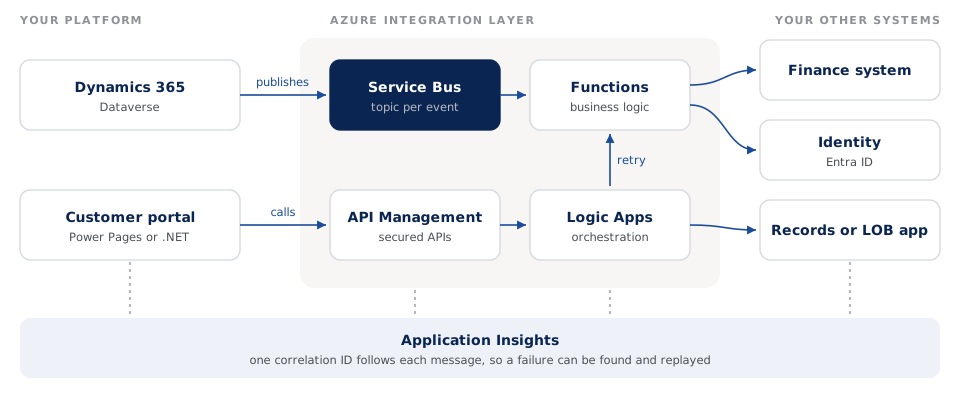
Connect Dynamics 365 and your other systems through messages instead of fragile point-to-point calls.
Signs your integration needs work
- Interfaces fail without anyone noticing until a user complains
- Scheduled polling jobs query systems whether or not anything has changed
- Every new system needs another custom point-to-point connection
- Nobody can say where a record got stuck between two systems
Event-driven by default
Systems publish changes to Azure Service Bus and subscribers act on them. Dataverse is called when data changes, not on a timer.
The right service for each job
Functions for business logic, Logic Apps for orchestration, API Management to publish and secure APIs, Event Hubs for high-volume streams.
Traceable end to end
Correlation IDs across Dataverse, Functions and external APIs in Application Insights, so a failed message can be found and replayed.
Secure by design
Managed identities, Entra ID authentication and network controls agreed with your security team.
A fixed-scope look at a live platform
An assessment of a live Dynamics 365 or Power Platform environment, ending in findings and a ranked plan you can take to your governance board. Duration and price are agreed up front.
What we look at
- API consumption and throttling
- Plugin, workflow and flow execution
- Integration load and failure handling
- Security model and release process
What you get
- Findings tied to evidence
- Root causes, not just symptoms
- Fixes ranked by benefit, effort and risk
- A 30, 60 and 90 day roadmap
Platform performance for a federal department
Cutting Dataverse load without cutting features
Read the success storyWe removed redundant plugin executions, moved heavy logic out of the synchronous pipeline, consolidated overlapping flows and replaced polling with Service Bus.
Outcome40% fewer Dataverse API calls, 60% fewer flow runs, transactions 30 to 50% faster, and no throttling at peak.
Related services
Custom software and applications
.NET, PHP and Blazor applications, portals, mobile apps, APIs and SaaS platforms, tested and documented.
Learn moreSupportManaged support and platform services
Hypercare, incident response, patching and SLA-based support for the platforms we build or inherit.
Learn moreDeliverDigital transformation and project delivery
Strategy, roadmaps, business cases, architecture, PMO and agile delivery, including projects that have stalled.
Learn more